Edge Security: Architecting Nginx Reverse Proxy with SSL Termination and Certbot
Moving encryption to the edge is a critical architectural pattern for microservices. Learn how to implement a hardened Nginx reverse proxy with automated SSL termination via Certbot, protecting backend application nodes within an isolated Docker fabric.
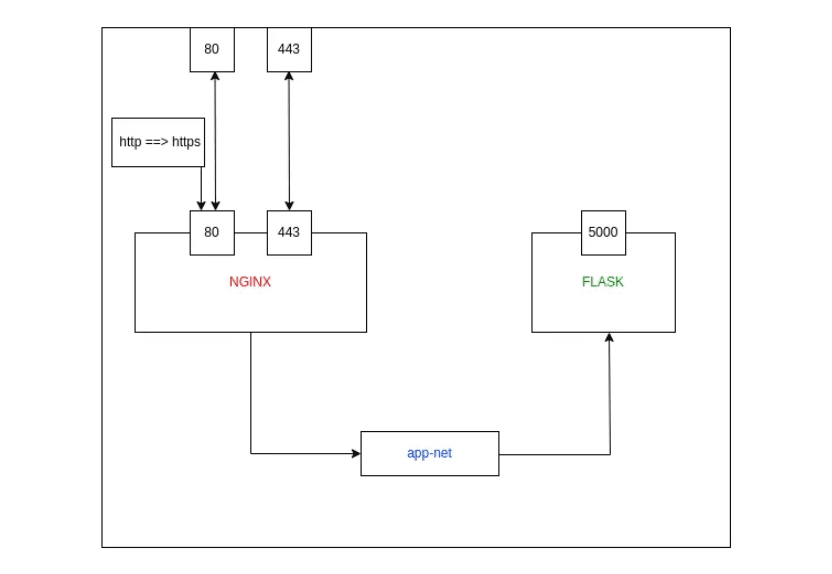
In a modern microservices architecture, managing SSL certificates for every individual service is an operational nightmare. The solution is SSL Termination at the Edge. By placing an Nginx Reverse Proxy at the entry point of your network, you can handle all encryption and decryption in one place, allowing your backend services to communicate over a high-speed, isolated internal network.
This guide explores the architectural workflow of setting up an Nginx gateway with automated Let's Encrypt certificates via Certbot, all orchestrated within Docker.
Phase 1: The Isolated Fabric (Network Setup)
To ensure backend services are not exposed to the public internet, we establish a private Docker bridge network. This allows Nginx to communicate with applications via their container names while keeping them invisible to external traffic.
Phase 2: Provisioning the Backend Microservices We deploy three redundant instances of our application. Note that these containers do not expose any ports to the host; they only exist within the app-net fabric.
Phase 3: Automated Certificate Orchestration (Certbot)
Before Nginx can serve HTTPS, we must obtain a valid certificate from Let's Encrypt. We use the Certbot Standalone mode, which temporarily spins up its own web server to verify domain ownership.
- DNS Preparation: Create an A Record in Route 53 (e.g., api.nidhin.com) pointing to your EC2 IP.
- Certificate Retrieval:
- Credential Management: Move the certificates to a dedicated staging directory for Docker mounting.
Phase 4: The Edge Blueprint (default.conf)
The Nginx configuration acts as the brain of the reverse proxy. It handles the HTTP-to-HTTPS upgrade and distributes traffic across the backend upstream cluster.
Phase 5: Initializing the Edge Node
Finally, we launch the Nginx container, mapping ports 80 and 443 and mounting our persistent configuration and certificates.
Why this handles scale:
- SSL Termination: The high-cpu task of decrypting traffic happens only once at the Nginx layer.
- Upstream Balancing: New backend containers can be added to the appservers block without changing the public-facing SSL setup.
- Resource Efficiency: Using nginx:alpine ensures the edge node consumes minimal system resources.
Conclusion
Setting up an Nginx reverse proxy with SSL termination turns a collection of containers into a professional, secure application stack. By centralizing encryption management and isolating your backend fabric, you achieve a resilient architecture that is both easy to maintain and inherently scalable.
Fuel the Architecture
If this deep dive helped you build something better, consider fueling my next late-night coding session.
Newsletter Updates
Join 1,000+ engineers receiving weekly insights into AI, cloud architecture, and technical guides.