High-Performance Containerization: Architecting Nginx and PHP-FPM Pipelines
Scale-out web applications require a clean separation of concerns. Explore the architectural workflow of containerizing a PHP environment—decoupling the Nginx delivery layer from the PHP-FPM processing engine via a private FastCGI mesh.
In a modern web architecture, the monolithic approach is a legacy bottleneck. For high-performance PHP applications, the gold standard is the Decoupled Delivery Model: separating the Nginx web server (which handles static assets and SSL) from the PHP-FPM engine (which handles dynamic logic execution).
By containerizing these components separately and connecting them via a private FastCGI network, we achieve independent scalability, localized security, and a significant reduction in resource overhead.
The Architecture: FastCGI Proxying
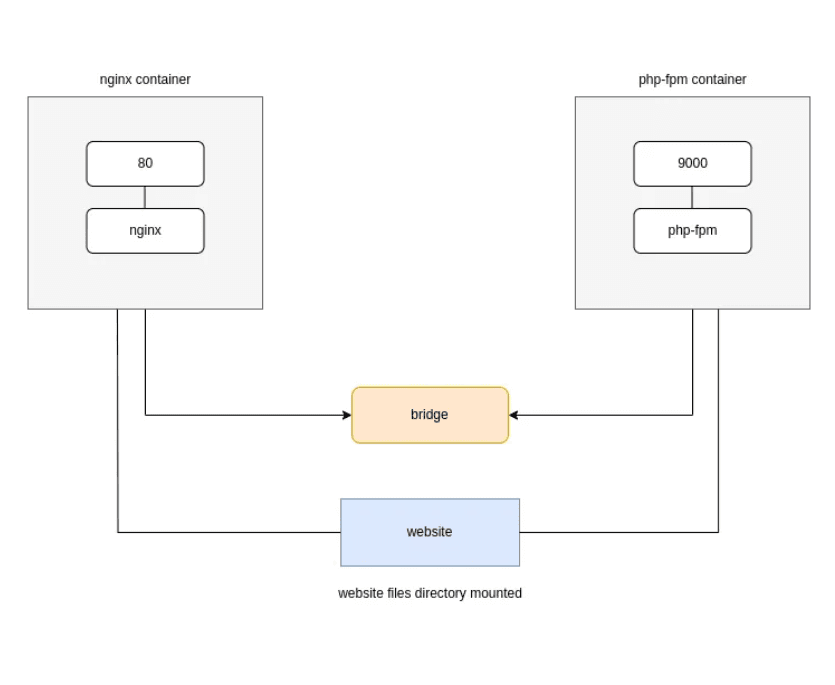
The core of this setup is the FastCGI Protocol. Nginx acts as a thin communication layer. When a client requests a .php file, Nginx identifies the request and "proxies" it to the PHP-FPM container on port 9000. The FPM node processes the code and returns the output to Nginx, which finally delivers it to the client.
Phase 1: Configuring the Orchestrator (default.conf)
We begin by establishing the logic in the Nginx configuration. This file defines the handshake between the delivery layer and the processing engine.
Phase 2: Establishing the Isolated Network Fabric
To allow our containers to communicate securely, we initialize a dedicated Bridge Network. This ensures that the PHP-FPM processing port (9000) is only accessible to Nginx, not the public internet.
Phase 3: Initializing the Nodes
We deploy the infrastructure in two distinct containers. Both containers must mount the same volume (/website) to ensure Nginx can find the static files and PHP-FPM can find the source code to execute.
- The Processing Node (PHP-FPM)
- The Delivery Node (Nginx)
Phase 4: Scaling the Logic Layer
The true advantage of this architecture is the ability to Scale-Out. If the application experiences high CPU load from PHP processing, we can add more FPM nodes without touching the Nginx web server.
To scale reliably, we upgrade the Nginx configuration to use an Upstream Block. This allows Nginx to load-balance traffic across multiple PHP-FPM containers.
By launching php-fpm2 on the php-app-net network, Nginx will automatically distribute the workload across both processing nodes, increasing the overall application throughput.
Conclusion
Containerizing with Nginx and PHP-FPM transforms your website into a modular, production-ready environment. By decoupling the delivery and processing layers, you ensure consistent behavior across systems and lay the foundation for a truly resilient microservices architecture.
Happy Containerizing! 🐳
Fuel the Architecture
If this deep dive helped you build something better, consider fueling my next late-night coding session.
Newsletter Updates
Join 1,000+ engineers receiving weekly insights into AI, cloud architecture, and technical guides.