Load Balancing Logic: Orchestrating Traffic Flow with NGINX and Containers
Redirection is the core of orchestration. Explore the internal mechanics of how NGINX functions as a high-performance reverse proxy to distribute traffic across a dynamic, horizontal pool of containerized application nodes.
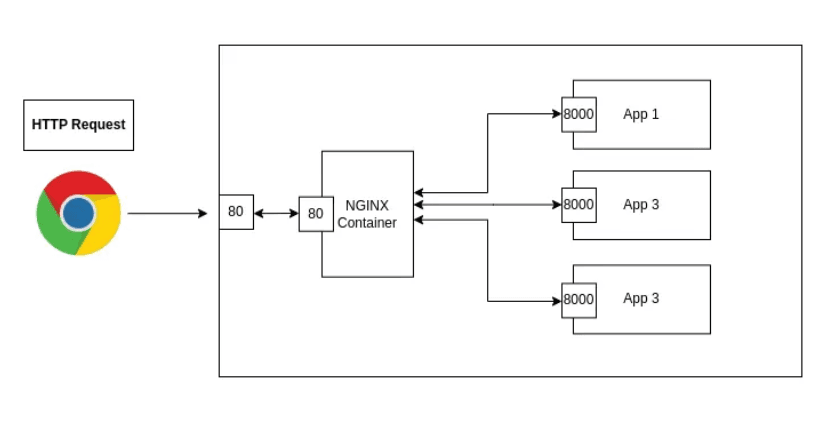
In a containerized ecosystem, individual containers are ephemeral and often isolated within a private network fabric. To expose these services reliably and handle high traffic volumes, we utilize NGINX as a Reverse Proxy and Load Balancer.
The core power of NGINX lies in its ability to perform Request Redirection acting as a centralized gateway that intelligently distributes incoming client traffic across a horizontal pool of backend "Upstream" servers.
The Upstream Paradigm: Logical Compute Groups
The foundation of NGINX load balancing is the upstream block. This directive allows you to define a logical group of servers that NGINX can reference by a single name. In a containerized world, these servers are individual application containers (e.g., App1, App2, App3) running across a shared network.
By grouping containers this way, you decouple your public-facing entry point (Port 80/443) from your internal application ports (Port 8000), providing a critical layer of Security through Abstraction.
The Redirection Lifecycle: From Client to Container
When a request enters the infrastructure, it undergoes a four-stage redirection process:
Stage A: The Gateway Interception
A client sends an HTTP request to the NGINX server (typically on Port 80). NGINX, acting as the Reverse Proxy, terminates this initial connection.
Stage B: Algorithmic Selection
NGINX evaluates the upstream group and selects a backend container based on its configured load-balancing algorithm.
- Round Robin (Default): Requests are distributed sequentially.
- Least Connections: Traffic is sent to the container with the fewest active sessions.
- IP Hash: Ensures a client is consistently redirected to the same backend container for session persistence.
Stage C: The Internal Proxied Handover
NGINX "redirects" the request by opening a new connection to the selected container (e.g., app1:8000) over the internal Docker network. The container receives this request as if it were coming directly from a client, but it only ever listens on its protected internal port.
Stage D: Response Delivery
The application processes the logic and returns the data to NGINX. NGINX then "relays" this response back to the original client, completing the lifecycle.
Architectural Resilience and Scaling
This redirection mechanism is more than just a relay; it provides two essential properties for production systems:
- Horizontal Scaling: If traffic increases, you can launch app4 and app5 and simply add them to the upstream block. NGINX will immediately begin distributing the workload to the new nodes without the client ever knowing the backend has changed.
- Health Abstraction: If app2 crashes, NGINX can detect the failure and automatically redirect traffic to the remaining healthy nodes (app1 and app3), ensuring zero-downtime availability for the end-user.
Conclusion
NGINX's redirection capabilities are the bridge between individual containerized tasks and a truly scalable web service. By centralizing traffic management through an upstream cluster, you create a resilient architecture that can grow dynamically with your workload.
Fuel the Architecture
If this deep dive helped you build something better, consider fueling my next late-night coding session.
Newsletter Updates
Join 1,000+ engineers receiving weekly insights into AI, cloud architecture, and technical guides.