Neural Nexus: Building a Live, Breathing Skill Graph
An inside look at how we built the Neural Nexus—an interactive skill graph that updates in real-time. Learn the basics of node-link data and how to use Supabase Realtime to keep your UI in sync with your database.
Neural Nexus: Visualizing Global Intelligence in Real-Time
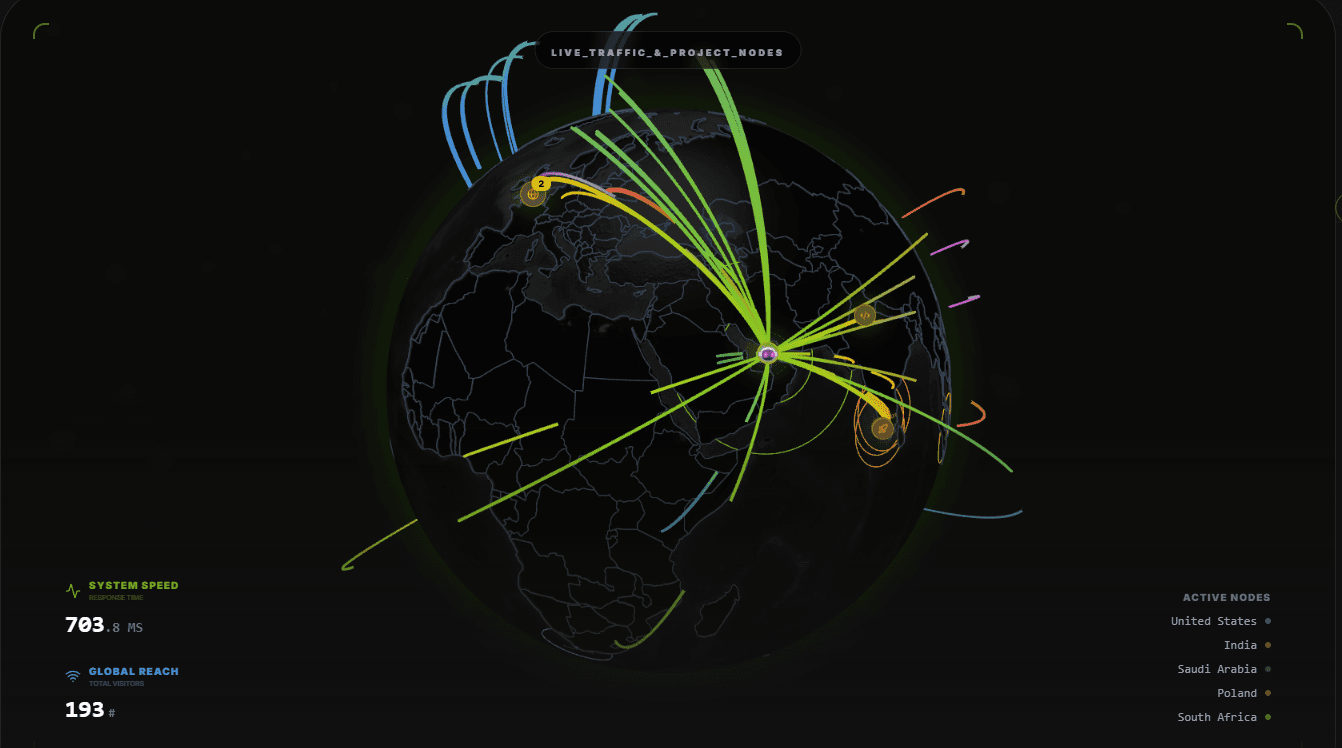
In a world where data is often hidden behind spreadsheets and static tables, I wanted to build something different. For my portfolio and the Psypher AI project management suite, I envisioned a "Global Heartbeat"—a living, breathing visualization of intelligence, traffic, and distributed infrastructure.
This became the Neural Nexus.
In this architectural deep-dive, I’ll explain how we moved from a static concept to a real-time reactive interface using Next.js, Supabase Realtime, and cinematic 3D rendering.
1. The Architectural Vision: More Than Just a Map
The goal of the Neural Nexus was not just to show "where people are," but to visualize the interconnectedness of our systems.
Most portfolios use a flat image or a simple visitor counter. We took a different approach by treating every visitor as a "Neural Node" and every connection as a "Synaptic Arc." This creates a "Command Center" aesthetic that reinforces the identity of an AI and Infrastructure Engineer.
Key Visual Layers:
- The Globe Shell: A 3D representation of the world, rendered on the client side to ensure buttery-smooth performance.
- Traffic Arcs: Dynamic lines that "fire" whenever a new session is detected, connecting the visitor's location to our "Dubai HQ."
- Infrastructure Nodes: Specialized markers that represent different technology hubs (San Francisco, London, Singapore) and project clusters.
- Neural Rings: Pulsing animations that indicate active regions and high-concurrency hotspots.
2. The Data Engine: How "Real-Time" Actually Works
The biggest challenge in building a live graph is ensuring the data stays in sync without killing server performance. If you have 100 people visiting at once, you cannot have them all "polling" (asking) the database every second.
This is where Supabase Realtime shines. Instead of the browser asking for updates, the database "pushes" updates to the browser the moment they happen.
The "Walkie-Talkie" Logic
We set up a PostgreSQL Replication stream. When a visitor hits our site, our visit API inserts a record into the device_locations table. Supabase observes this change and broadcasts it globally via WebSockets.
Here is the conceptual implementation we use in our NeuralGlobe component:
3. High-Performance Visualization
Rendering hundreds of moving arcs and pulsing nodes can be heavy on the CPU. To solve this, we used Client-Side Rendering (CSR) and Dynamic Imports.
Dynamic Loading
Because a 3D globe is a heavy file, we do not want to load it immediately when the page starts. We use next/dynamic to load the Nexus only when the user scrolls near it:
Motion and Interaction
We use Framer Motion to handle the "HUD" overlay (the text and stats in the corners). This allows us to animate the system speed and visitor counts with sub-millisecond precision, contributing to that "Active Monitoring" feel.
4. Beginner Guide: How to Start Small
If you are a beginner wanting to build your own Nexus, do not feel intimidated by the 3D globe! You can start with a 2D version:
- Database: Set up a free Supabase project and create a table for visits.
- API: Create a simple Next.js API route that captures the user's IP (and uses a geocoding service to find the city).
- Real-Time: Use the
supabase.channel()logic shown above to listen for inserts. - UI: Instead of a globe, use a simple div list. When a new visit is "pushed" to your app, make that list item scroll down or glow using CSS animations.
Conclusion
The Neural Nexus is more than a widget: it is the bridge between raw data and human experience. By combining Supabase’s backend speed with React’s reactive UI, we created a portal that shows the world exactly how our infrastructure is breathing.
Ready to explore the grid? Head back to the homepage and hover over the nodes to see the project architecture in detail. That is the future of intelligent portfolios. 🚀
Subscribe now to get more "behind the scenes" looks at our AI-driven infrastructure!
Fuel the Architecture
If this deep dive helped you build something better, consider fueling my next late-night coding session.
Newsletter Updates
Join 1,000+ engineers receiving weekly insights into AI, cloud architecture, and technical guides.